React JWT Authentication with Axios: Handling Access and Refresh Tokens
React JWT Authentication with Axios: Handling Access and Refresh Tokens
By Navindu Amerasinghe · September 16, 2024 · 7 min read
JWT Auth Token and JWT Refresh Token
A JWT architecture usually has two parts one is authToken and others are refreshToken. Where authToken is responsible for authenticating the user and refreshToken is responsible for getting the new authToken from the backend without asking for username and password from the user. Yes! authTokens expires. Well for security purposes we set up our authToken in such as way that it expires in a while and uses the refresh token to fetch the authToken back.
Understanding the flow of JWT.
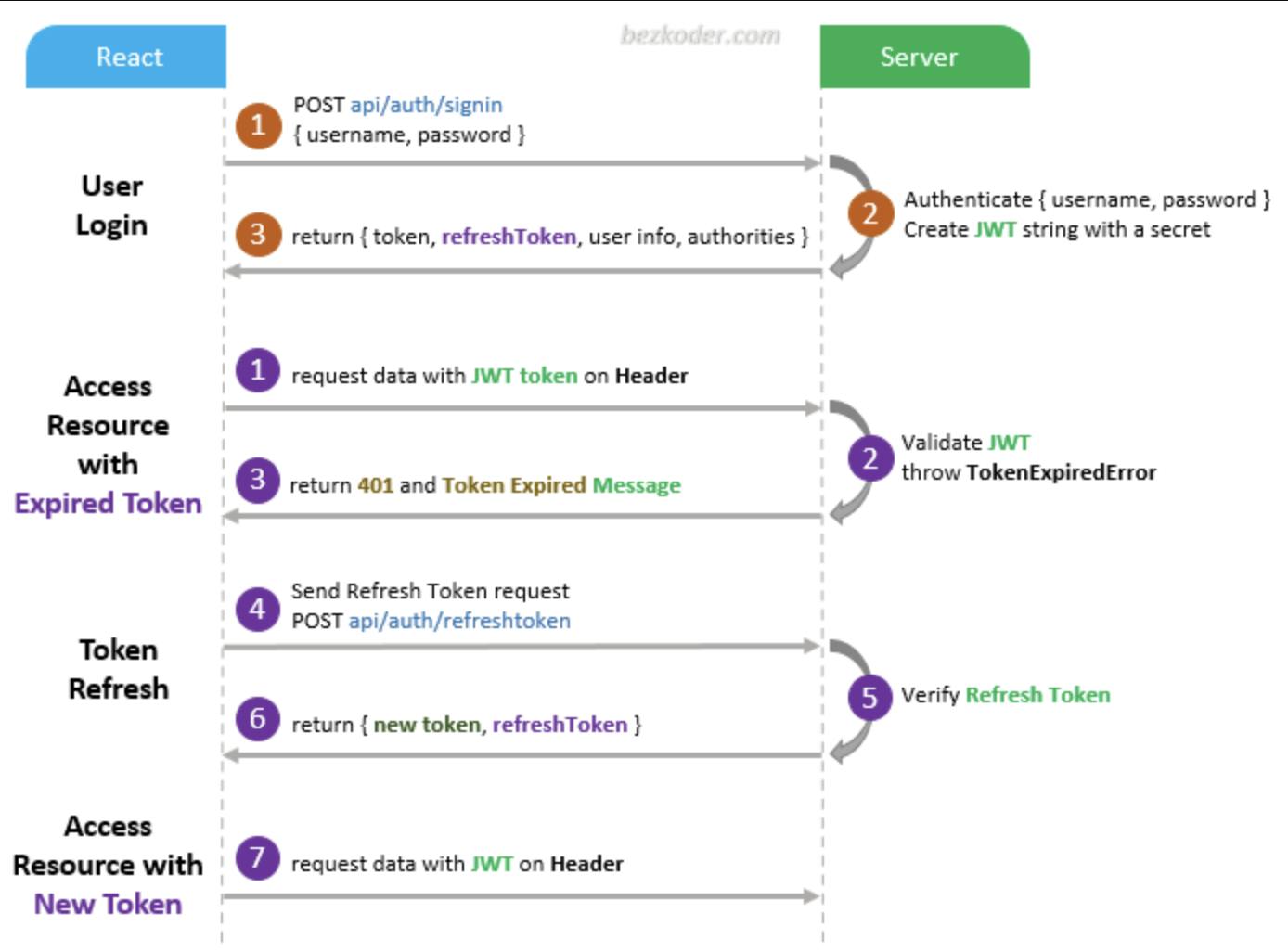
User Logins: User logins with username (email) and password which then goes back to the server to create a new JWT token. A simple JWT token contains JWT authToken and JWT refreshToken both tokens have an expiry generally and refreshToken should always have a greater expiry date than authToken. Token Received: Once the JWT token is received by the front end they can save that JWT token into local storage or to an in-memory store like Redux. Depends on preferences but there are some standard ways to do that. Making Calls: Once the JWT token is saved, all calls which use authentication/authorisation ( Yes mate both are different concepts) uses this JWT token to successfully validate the request. Token expiry: Once the JWT token is expired which as we already know going to happen the JWT refresh token is used to authenticate the API call and used to fetch the new JWT tokens. (Note: Refresh token can only authenticate the API route which is used to get the new tokens) Using the new Auth Tokens: Once you get the new JWT tokens you can use the authTokens to make the API calls to the server. Repeat the Process: Keep repeating the process to get the new authTokens and making the API call.
Table of Contents
- JWT Token
- JWT Auth Token and JWT Refresh Token
- Understanding the flow of JWT
- Handling JWT Token in React
- Setting Up Axios Interceptor for the JWT tokens
- Using the above solution in our Application
JWT Token
JSON Web Tokens (JWT) are used to authenticate a client to the server. They provide a secure way to transmit information between two parties (client and server). JWT consists of three parts:
- Header: Contains metadata like algorithm and token type.
- Payload: Includes the claims (information about the user).
- Signature: Verifies the token hasn't been tampered with.
{
  "alg": "HS256",
  "typ": "JWT"
}
{
"sub": "1234567890",
"name": "John Doe",
"iat": 1516239022
}JWT example:
eyJhbGciOiJIUzI1NiIsInR5cCI6IkpXVCJ9.eyJzdWIiOiIxMjM0NTY3ODkwIiwibmFtZSI6IkpvaG4gRG9lIiwiaWF0IjoxNTE2MjM5MDIyfQ.SflKxwRJSMeKKF2QT4fwpMeJf36POk6yJV_adQssw5cJWT Auth Token and JWT Refresh Token
JWT architecture typically includes two types of tokens:
- authToken: Used for authenticating the user.
- refreshToken: Used to fetch a new authToken when the authToken expires, without requiring the user to log in again.
Understanding the flow of JWT
- User Logins: User submits their credentials to receive JWT authToken and refreshToken.
- Token Storage: The tokens are stored in localStorage or in memory.
- Authenticated Requests: API requests include the authToken for authorization.
- Token Expiry: If the authToken expires, the refreshToken is used to fetch a new one.
- Repeat Process: The cycle repeats to keep the user authenticated without needing to log in again.
Handling JWT Token in React
We will create a simple Login component to handle authentication:
import React, { useState } from 'react';
import axios from 'axios';
const Login = () => {
const [credentials, setCredentials] = useState({ email: '', password: '' });
const handleChange = (e) => {
setCredentials({ ...credentials, [e.target.name]: e.target.value });
};
const handleSubmit = async (e) => {
e.preventDefault();
try {
const response = await axios.post('/api/login', credentials);
const { token, refreshToken } = response.data;
localStorage.setItem('token', token);
localStorage.setItem('refreshToken', refreshToken);
// Perform post-login actions (e.g., redirect)
} catch (error) {
// Handle login errors
}
};
return (
);
};
export default Login;In the above component, users submit their credentials, and the JWT tokens are stored in localStorage for future use.
Setting Up Axios Interceptor for the JWT tokens
Now that we have JWT tokens stored, we need to ensure that every API call is authenticated. We can do that by setting up an Axios interceptor to include the authToken in the request headers:
import axios from 'axios';

const api = axios.create({ baseURL: '/api' });

api.interceptors.request.use(
  (config) => {
    const token = localStorage.getItem('token');
    if (token) {
      config.headers.Authorization = \`Bearer \${token}\`;
    }
    return config;
  },
  (error) => Promise.reject(error)
);

export default api;
What about when the JWT authToken expires? For this, we set up another interceptor for the response. If the status code is 401 (Unauthorized), the interceptor will fetch a new authToken using the refreshToken:
api.interceptors.response.use(
  (response) => response,
  async (error) => {
    const originalRequest = error.config;

    if (error.response.status === 401 && !originalRequest._retry) {
      originalRequest._retry = true;
      try {
        const refreshToken = localStorage.getItem('refreshToken');
        const response = await axios.post('/api/refresh-token', { refreshToken });
        const { token } = response.data;
        localStorage.setItem('token', token);
        originalRequest.headers.Authorization = \`Bearer \${token}\`;
        return axios(originalRequest);
      } catch (error) {
        // Redirect to login on refresh token failure
      }
    }
    return Promise.reject(error);
  }
);
Using the above solution in our Application
Now, let’s use our Axios setup to fetch profile data securely in a component:
import React, { useEffect, useState } from 'react';
import api from './api';

const Profile = () => {
  const [user, setUser] = useState(null);

  useEffect(() => {
    const fetchProfile = async () => {
      try {
        const response = await api.get('/profile');
        setUser(response.data);
      } catch (error) {
        // Handle errors
      }
    };

    fetchProfile();
  }, []);

  if (!user) {
    return Loading...;
  }

  return (

      {user.name}'s Profile
      Email: {user.email}

  );
};

export default Profile;
Conclusion
JWT provides a powerful way to manage user authentication. Setting up Axios interceptors in React simplifies handling tokens, making API calls secure and automated. Remember to handle token storage securely (avoid storing sensitive tokens in localStorage if possible), and always invalidate tokens properly.


Comments
Post a Comment